



The Gotek has become one of the most popular accessories among people who still use a real Amiga today. It allows games, demos and programs to be loaded from a USB stick instead of floppy disks, reducing read errors, wear on original media and endless disk swapping. The most common solution is to install it internally in place of the floppy drive, but not everyone wants to give up the original drive inside their Amiga 500.
There is, however, a very interesting alternative: using the Gotek as an external drive and, through a DF0 selector, making the Amiga recognize it as the main drive when needed. This way you can keep the original internal floppy drive, use the Gotek to boot games and software from USB, and choose each time which drive should act as DF0.
It is an elegant solution, but not a completely “magical” one: it still requires opening the Amiga and installing a DF0 selector on the motherboard. It is not an especially complicated intervention, but it must be done calmly, carefully and with a minimum level of awareness.
Why use an external Gotek
The main reason is simple: preserving the look and original configuration of the Amiga 500. Many users prefer not to replace the internal floppy drive, both for aesthetic reasons and to keep the machine as close as possible to its period configuration.
An external Gotek lets you have the best of both worlds. On one side, the original drive remains available for reading real floppy disks; on the other, you can use a USB stick with ADF disk images, demos, utilities and games. It is particularly convenient for anyone who often uses software downloaded or archived in digital format, but does not want to turn the Amiga into a fully modified machine.
Compared with an internal Gotek, the external configuration is also more reversible. The Gotek does not take the place of the original floppy drive and can be disconnected when not needed. The delicate part remains the DF0 selector, because it is what allows the Amiga to see the external drive as the main boot drive.
What you really need
To use an external Gotek as DF0 on an Amiga 500, you need a few specific components. The first is, of course, a Gotek compatible with Amiga, preferably already configured with FlashFloppy. Versions with an OLED display and rotary encoder are more convenient, because they allow you to browse disk images much more clearly than with the simple numeric display.
You also need a cable to connect the Gotek to the Amiga’s external floppy port. Not all cables are the same, so it is important to choose one designed for Amiga and for use with external drives. An incorrect connection can prevent the device from working or, in the worst cases, cause hardware problems.
The third element is the DF0 selector. This is the component that allows the role of the internal and external drives to be swapped, making the external Gotek become DF0 when needed. Without this selector, the Amiga 500 normally continues to boot from the internal floppy drive, while the external Gotek is seen as DF1.
Finally, you need a USB stick, preferably simple, not too large and well organized. On machines and firmware of this kind, it is often better to avoid huge storage devices or chaotic folders full of files: a clean structure makes everything more stable and easier to use.
What is a DF0 selector?
On classic Amiga systems, DF0 is the main floppy drive, the one from which the machine normally attempts to boot. In the case of the Amiga 500, DF0 is the internal drive. An external drive connected to the side port is instead seen as DF1.
The problem is that many games and programs, especially those designed to boot directly from floppy disk, expect to start from DF0. For this reason, an external Gotek without any modification is not always enough: it may work as a second drive, but it will not behave as the main unit.
The DF0 selector solves precisely this limitation. In practice, it allows you to choose which drive should be seen as DF0: the original internal drive or the external Gotek. It is a very useful modification, because it does not force you to remove the Amiga’s floppy drive, but still allows software to boot from USB.
One important point must be made clear: the selector is not a purely external adapter. It is usually installed internally, involving the CIA chip and its socket. For this reason, the Amiga must be opened and handled with care.
Step-by-step installation
Before starting, completely disconnect the Amiga from the power supply and from all peripherals. Open the Amiga 500 case by removing the screws underneath and carefully lifting the upper part with the keyboard. Work on a clean, stable and well-lit surface.
Once you reach the motherboard, identify the CIA chip used by the DF0 selector. Depending on the selector model and the motherboard revision, the instructions may vary slightly: for this reason, always follow the diagram provided by the component manufacturer.
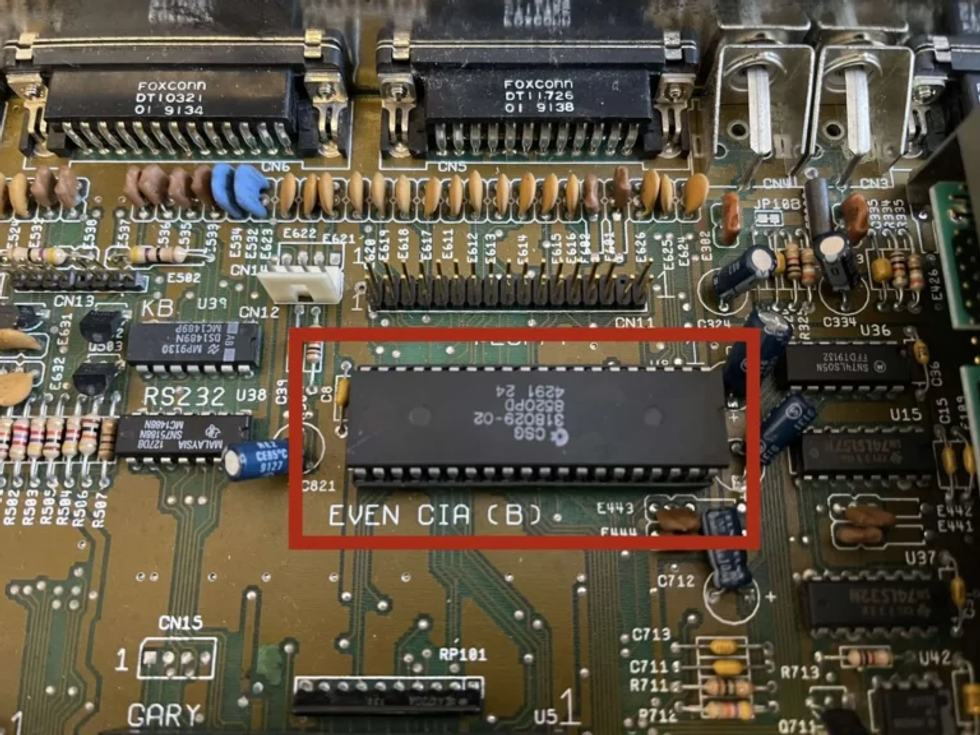
The most delicate step is removing the chip from its socket. This must be done slowly, lifting a little at a time from both sides, without forcing and without bending the pins. A small flat screwdriver can help, but it must be used with great caution.
Once the chip has been removed, insert the DF0 selector into the socket, respecting the correct orientation, then reinstall the CIA chip on top of the selector. Before closing everything, check that the pins are aligned and that the component is inserted evenly.
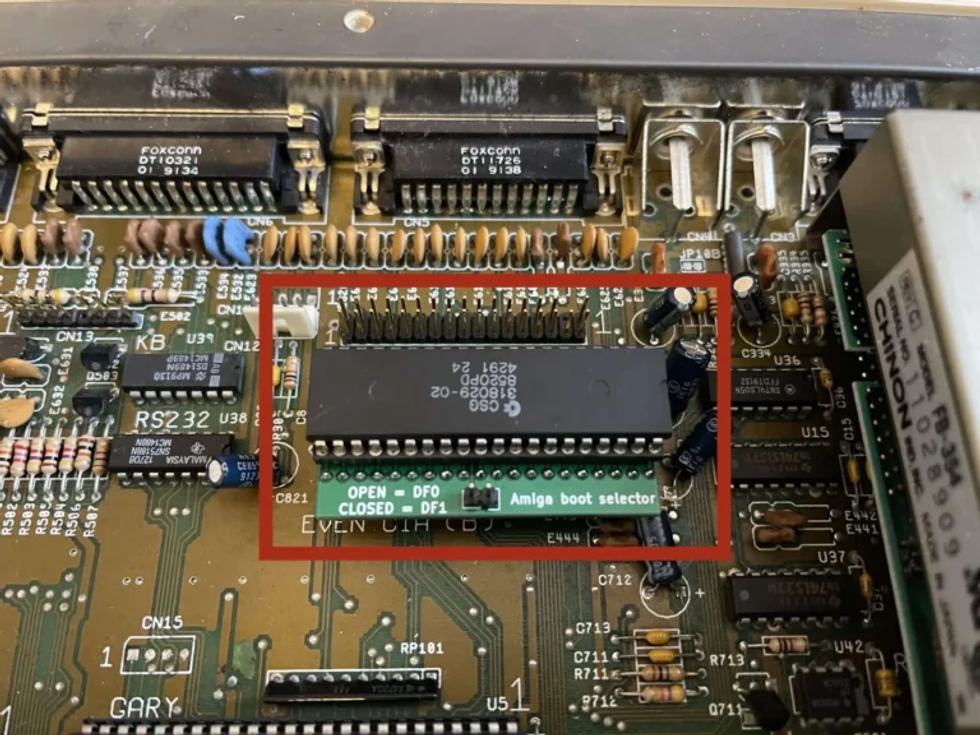
At this point, the selector control must be made accessible. The cleanest solution is to look for a reversible path, without modifying the case. Alternatively, you can drill a small hole to mount the switch externally, but this is a more invasive choice and should be considered carefully. In my case, I used a hole that was already present, made years ago for a Kickstart switcher.
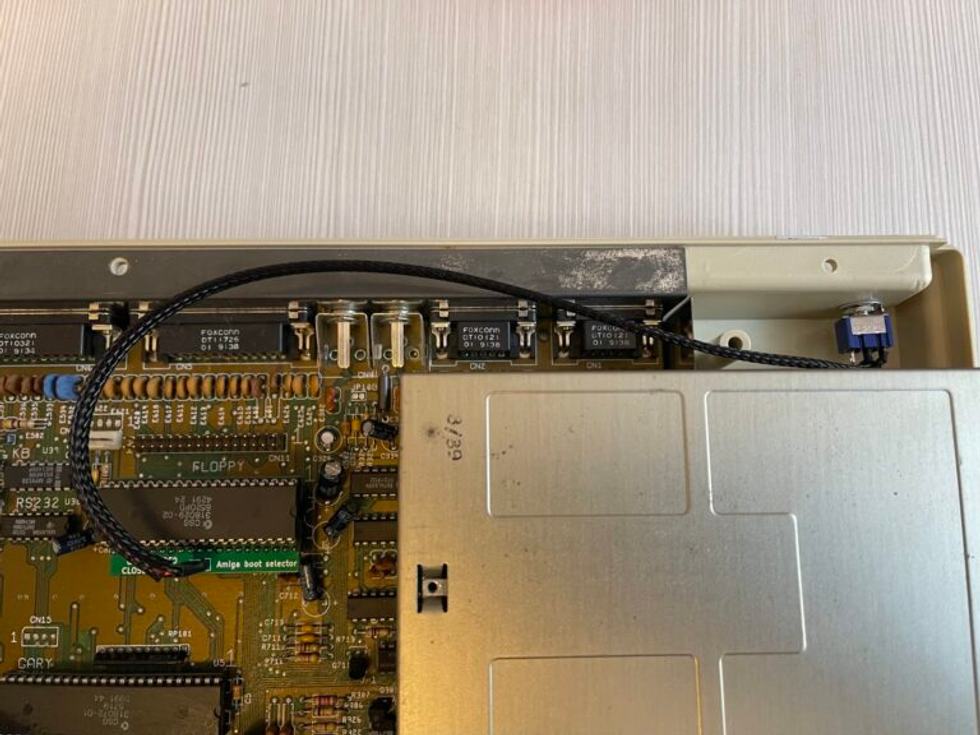
Once the Amiga is closed again, connect the Gotek to the external floppy port using the correct cable. With the computer switched off, use the selector to choose which drive should act as DF0: the original internal floppy drive or the external Gotek. Only then switch the machine on.
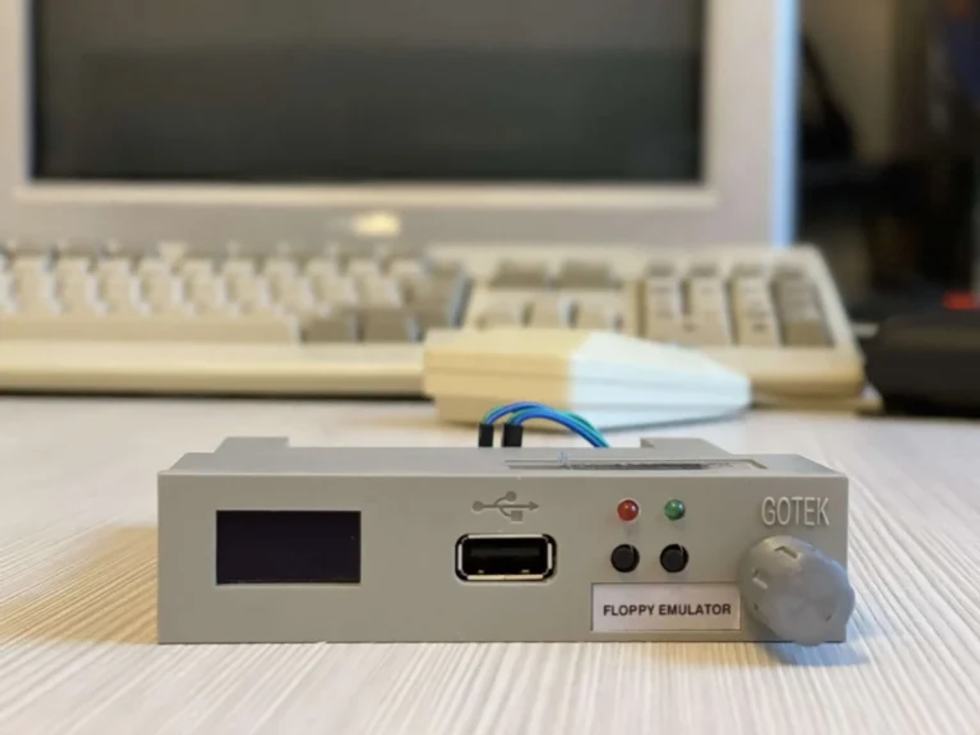
It is good practice not to change the selector position while the Amiga is switched on. It is better to turn the computer off, choose the desired configuration and switch it on again, avoiding unnecessary risks on hardware that is now more than thirty years old.
Which Gotek should you choose?
The cheapest option is a basic Gotek to configure manually. It can be fine if you want to experiment, update firmware and prepare everything yourself, but it is not necessarily the most convenient solution for someone who simply wants to use the Amiga without complications.
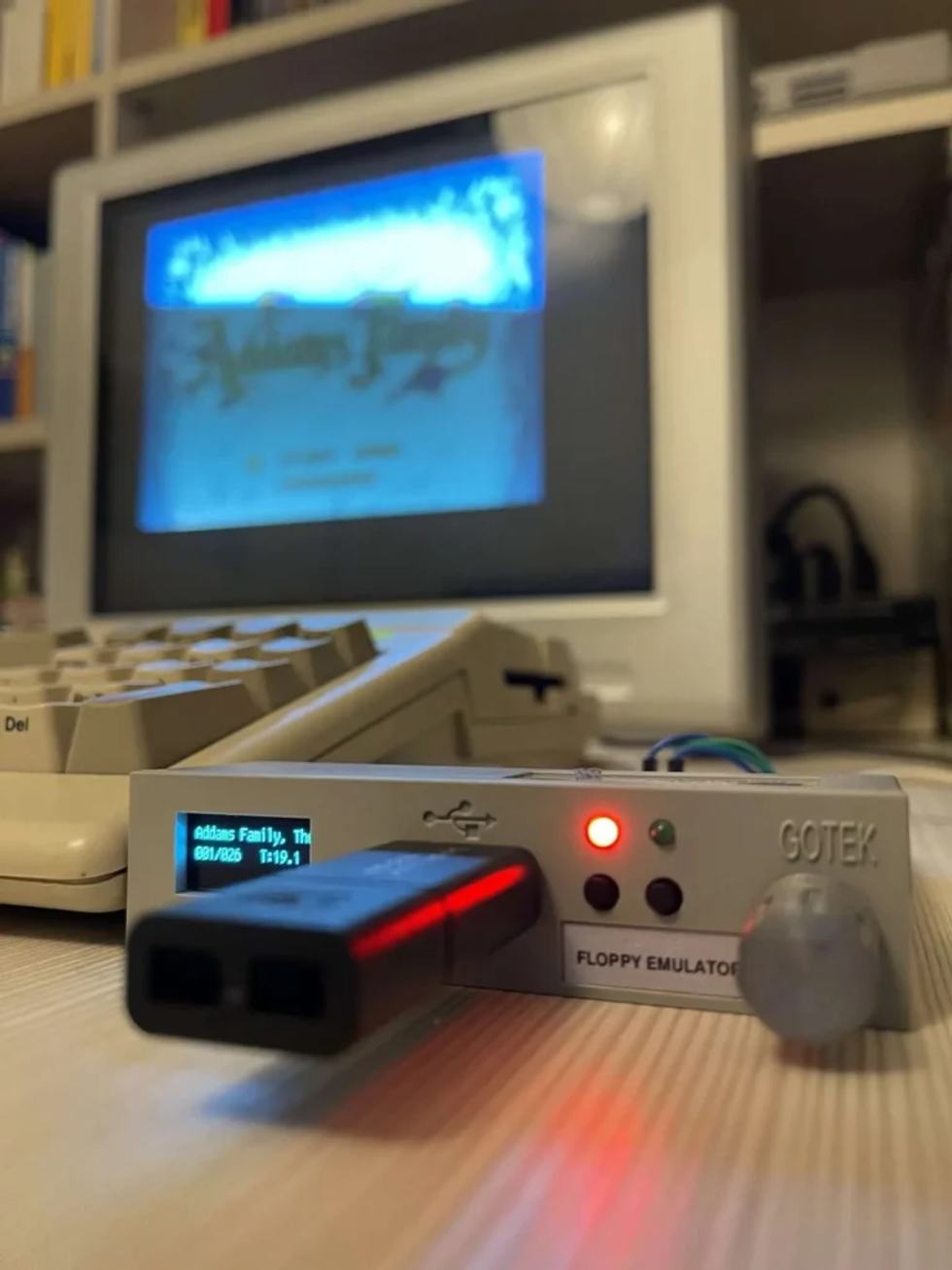
The most practical choice is a Gotek already configured for Amiga, with FlashFloppy installed, OLED display and rotary encoder. The OLED display makes the selected disk image name much easier to read, while the rotary encoder allows you to browse files and folders more comfortably. These are details that make a big difference in daily use.
For external use, also check the case type, connector and cable quality. A neat, protected and well-connected Gotek is much more pleasant to use than an improvised solution with exposed wires or unclear adapters.
Gotek or Compact Flash?
Gotek and Compact Flash do not do exactly the same thing. The Gotek emulates the floppy disk: it is ideal for booting ADF images, trying games, demos, intros and software designed to be loaded as if from disk. It keeps a logic very close to the original experience, but with the convenience of USB.
Compact Flash used as a hard drive, on the other hand, turns the Amiga into a much faster and more convenient machine for using Workbench, WHDLoad and installed software. It offers a more modern experience, because games and programs can be ready without changing virtual disks every time.
The best choice depends on how you use the Amiga. The Gotek is perfect if you want to stay close to the floppy disk logic. Compact Flash is ideal if you want a faster and more organized system. In many cases, the two solutions can coexist: Gotek for disk images and compatibility, Compact Flash for the operating system and installed games.
Where to buy
Today, Gotek units and compatible accessories can be found through several channels. Amazon can be convenient for buying a generic Gotek or a USB stick, but the products are not always already configured for Amiga. eBay is often more useful for finding DF0 selectors, specific cables and solutions prepared by enthusiasts or small specialized sellers.
Shops dedicated to the Amiga world, such as AmigaStore and other retro hardware retailers, may cost a little more, but often offer tested products, clearer documentation and greater peace of mind. For those who do not want to waste time with firmware, jumpers and compatibility, spending a little more can be worth it.
The best advice is not to choose based on price alone. With vintage hardware, a wrong component or unsuitable cable can cost far more time than the money saved.
Final advice
Using an external Gotek as DF0 is one of the smartest ways to make the Amiga 500 more practical without giving up the original floppy drive. It is not a completely external modification, because the DF0 selector requires an internal intervention, but it remains a very interesting compromise between modern convenience and respect for historic hardware.
With a properly configured Gotek, a suitable cable and a carefully installed selector, the Amiga becomes much easier to use while preserving much of its original charm. For anyone who wants to keep using the machine for real, not just display it, it is one of the most useful upgrades.
Reader memories
Comment on the article and join the discussion.
Comment rulesLog in or register to leave a comment.
Create your account
Loading comments...